

For a long time my to-do list lived in about four different places at once. Half of it was in a notes app I forgot to check, a third was on sticky notes stuck to the edge of my monitor until they curled up and fell behind the desk, and the rest existed only in my head, which meant it evaporated the second a phone call or an email pulled my attention somewhere else. I'd get to 3pm having done a lot of things, just not the things that actually mattered that day.
The fix that finally stuck for me wasn't a new app or a more complicated system. It was smaller and, honestly, a little old-fashioned. I keep a small glass dry erase board sitting flat on my desk, right in the space between my keyboard and my monitor, where I physically cannot avoid looking at it. I've been using the Quartet glass desktop whiteboard for a little over four months now, and what changed wasn't the tool, it was the habit the tool made possible. Here's the exact step-by-step system I use, in case your desk currently looks the way mine used to.
Stop losing your morning to a to-do list scattered across three places
The Quartet glass desktop whiteboard sits right where you already look, no app to open, no note to lose behind the desk. It's the one piece of desk gear that's actually changed how my day starts.
Amazon Check Today's Price on Amazon →Step 1: Set it up somewhere you can't ignore
Before you write a single word on it, figure out exactly where the board is going to sit. This matters more than the system itself. I first tried propping mine up against the wall behind my monitor, out of the way, and I basically never looked at it again after the first day. It was tidy, but it was invisible, and invisible doesn't help you plan anything.
Now it lays flat between my keyboard and my monitor stand, at roughly the same eye level as my screen. The Quartet board is 18 inches by 6 inches, which is small enough to fit that gap on most desks without crowding anything, but big enough to hold a real list, not just three words. If your desk is tighter, even a corner near your mouse hand works, as long as it's somewhere your eyes naturally land during the day.
Give it a wipe with a dry cloth before the first use, even brand new glass sometimes has a light film on it from packaging, and it'll erase cleaner from day one if you start clean. The board comes with a narrow groove along the bottom edge that holds the marker and a small eraser cloth, so both stay right there instead of wandering off to a drawer somewhere. Small thing, but it's the difference between using it daily and using it for a week and quitting.
Give the placement a real trial before you settle on it, at least a full workday, not just five minutes of glancing at it while you set it up. I moved mine three times in the first week before landing on the spot between keyboard and monitor stand. Your desk isn't my desk, and the right spot is simply wherever your eyes land without you having to think about looking for it.

Step 2: Write your Big Three before you open anything else
Here's the actual system, and it's deliberately simple. Before I open email, before I open my laptop even, I write three things on the board. Not ten things, not a full brain dump, three. These are the tasks that, if I got nothing else done that day, would still make it a genuinely good day. Everything else is extra.
I learned this the hard way after spending a few weeks writing enormous lists, twelve or fourteen items, that just stared back at me looking impossible by 10am. A long list on a whiteboard does the same thing a long list in an app does, it becomes background noise you stop reading. Three items stay readable at a glance every single time you look up from your screen, which for me is dozens of times a day.
Number them 1, 2, 3 in the order you'll actually tackle them, not in the order they occurred to you. That numbering step alone cut down on the amount of time I spent each morning re-deciding what to do next. The decision gets made once, at the start, while my head is clearest.
One small habit that made a real difference: write bigger and looser than feels natural at first. A cramped, tiny scrawl is easy to skim past without actually reading it, which defeats the whole point. A fine-tip dry erase marker on the Quartet board's glass surface writes clean and dark enough that even three or four words per line stay legible from a normal sitting distance, so there's no excuse to shrink your handwriting down to fit more in.
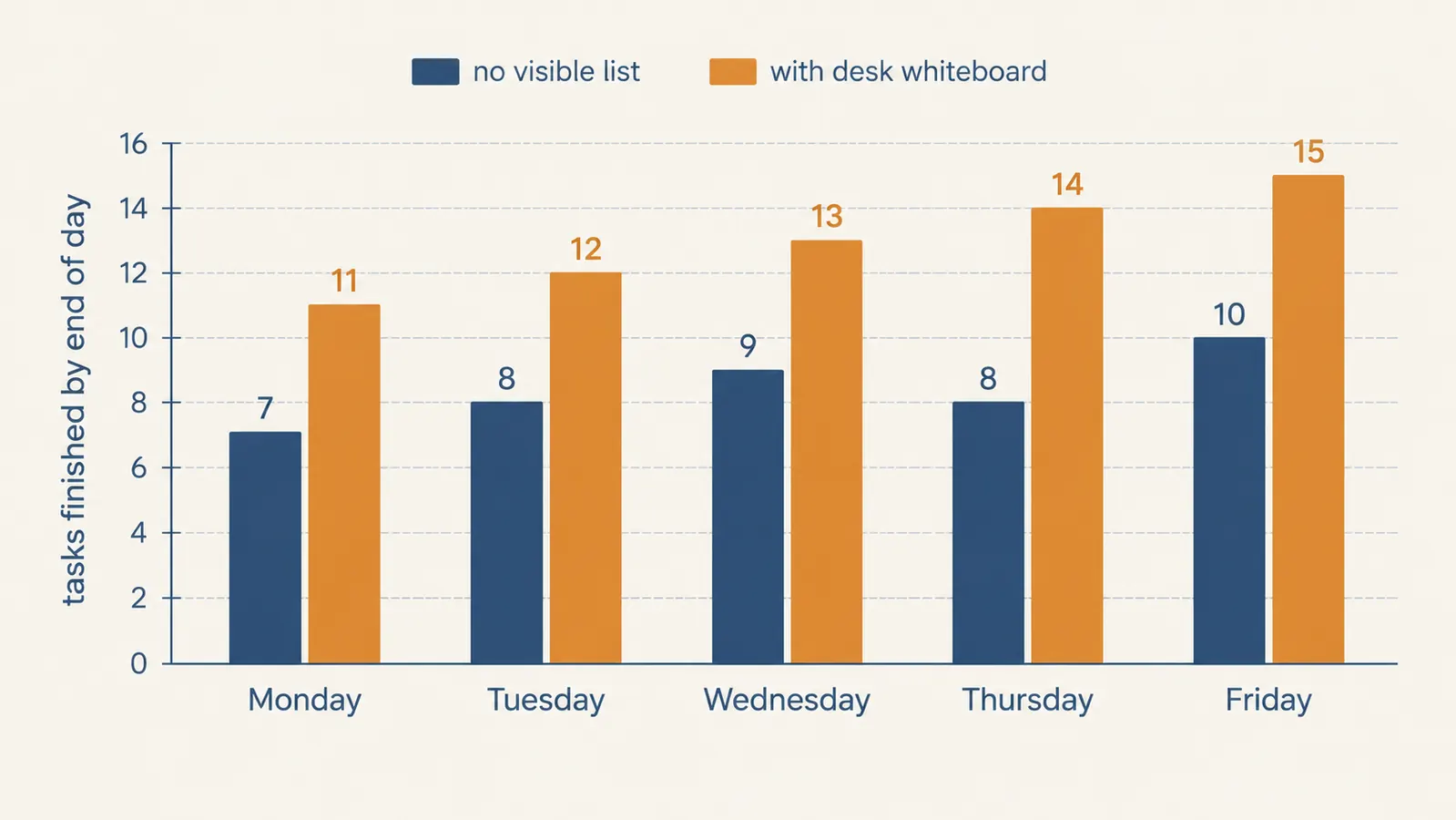
Step 3: Block real time next to each item
A list without a time attached to it is just a wish. Next to each of my three items, I write a rough time block, not a precise schedule down to the minute, just something like '9-10' or 'before lunch.' It doesn't need to be exact. It needs to exist so the item has a home in the actual day instead of floating around waiting for a good moment that never quite arrives.
The glass surface on the Quartet board makes this easy to adjust, which matters because your morning plan rarely survives contact with an actual morning. If a call runs long or something urgent lands in your inbox, I just wipe that one time block and rewrite it rather than starting the whole list over. That's one advantage a physical board has over a printed planner page: erasing one line doesn't mean scrapping the whole sheet.
I also leave a small blank line at the bottom for anything that comes up mid-morning that's genuinely urgent enough to bump one of the original three. Writing it there, rather than just mentally noting it, keeps it visible and keeps me honest about whether it actually deserves to bump something or if it can wait until tomorrow.
If your work runs on a weekly rhythm more than a daily one, you can adapt this same board to a rough week-at-a-glance instead, five short columns instead of one list. I still prefer the daily version myself, but a few people who've borrowed my system for a month told me the weekly layout worked better for their job, so there's no single right way to divide the space.

Step 4: Use the edge space for the stuff you don't want to forget
The main list takes up most of the board, but I leave a narrow strip along the right edge for what I think of as the parking lot, small reminders that aren't part of today's Big Three but that I don't want to lose track of. Things like 'call the dentist,' 'renew the domain,' or 'follow up with Marcus next week.' These aren't tasks for today, they're things I'd otherwise write on a sticky note and lose.
This is the piece that replaced almost all of my sticky notes. Instead of five or six little squares of paper drifting around my desk, everything lives in one spot on the same glass whiteboard. When something in the parking lot becomes relevant, I move it into tomorrow's Big Three instead of letting it sit there for three weeks feeling vaguely guilty about it.
Because the Quartet board is glass rather than the older melamine style whiteboards, nothing ghosts or stains into the surface over time, which matters if you're going to be writing and erasing in that same corner every single day for months. I've had cheaper whiteboards in the past that developed a permanent gray haze after a few weeks of daily use. This one still wipes back to completely clear.
A second color marker helps here too, one color for the day's actual tasks, a different color for the parking lot reminders. It sounds like a small touch, but the color split lets your eyes sort the two categories apart at a glance, without having to actually read every line to know which section you're looking at.
Step 5: Wipe it clean at the end of the day, on purpose
This last step is the one people skip, and it's the one that makes the whole system actually work long term. At the end of my workday, before I close the laptop, I wipe the board completely blank. Not just cross off what's done, actually erase it back to nothing. Whatever didn't get finished either genuinely doesn't matter or it becomes tomorrow's first item, written fresh.
Starting each morning with a blank board instead of yesterday's half-crossed-out mess makes a bigger difference than it sounds like it should. A board covered in three days of leftover scribbles stops feeling like a planning tool and starts feeling like clutter, which is exactly the problem this whole system is supposed to solve in the first place.
It takes about fifteen seconds with the cloth stored right on the board. That's the entire cost of resetting your whole system for the next day. Compare that to reorganizing a stack of sticky notes or scrolling back through a notes app trying to figure out what you actually finished, and the glass board wins on effort alone.
On Fridays I do a slightly bigger version of this reset. Before wiping, I glance back over the week's worth of parking lot items still sitting on the edge and decide, honestly, whether any of them are ever actually going to happen. If not, they get wiped along with everything else instead of dragging into next week out of habit. It's a small weekly cleanup that keeps the board from quietly filling up with things I was never really going to do.
What Else Helps
A desktop whiteboard solves the visibility problem, the plan is right in front of you instead of buried somewhere. But it works best alongside a couple of small habits. I do my Big Three write-up before opening email, not after, because email has a way of rearranging your priorities to whatever just landed in your inbox rather than what you actually decided mattered. I also keep the board angled slightly toward me rather than flat, which the Quartet board's low profile makes easy since it doesn't need much of an angle to read comfortably. And if you share a desk or work near family, a quick heads up that the board is your working list, not a shared notepad, saves you from finding someone else's grocery list mixed in with your Tuesday plan.
If you're someone who also needs a bigger-picture view, keeping a simple wall calendar nearby for month-level deadlines pairs well with the desktop board without competing with it. The wall calendar handles the far-off dates, the Quartet board handles today. Trying to cram both jobs onto one small glass surface just brings back the same clutter problem the board was supposed to fix in the first place.
It's not a complicated system. It's three items, a rough time next to each one, and a clean wipe at the end of the day. But it's the first planning habit I've ever actually kept for more than a few weeks.
Your day doesn't have to start with a scavenger hunt for your own to-do list
If sticky notes and half-remembered lists have been running your mornings, the Quartet glass desktop whiteboard is a small, low-effort change that's genuinely held up to daily use at my desk for months. It's the first thing I write on every morning.
Amazon Check Today's Price on Amazon →